
JDLSCANPre-alpha
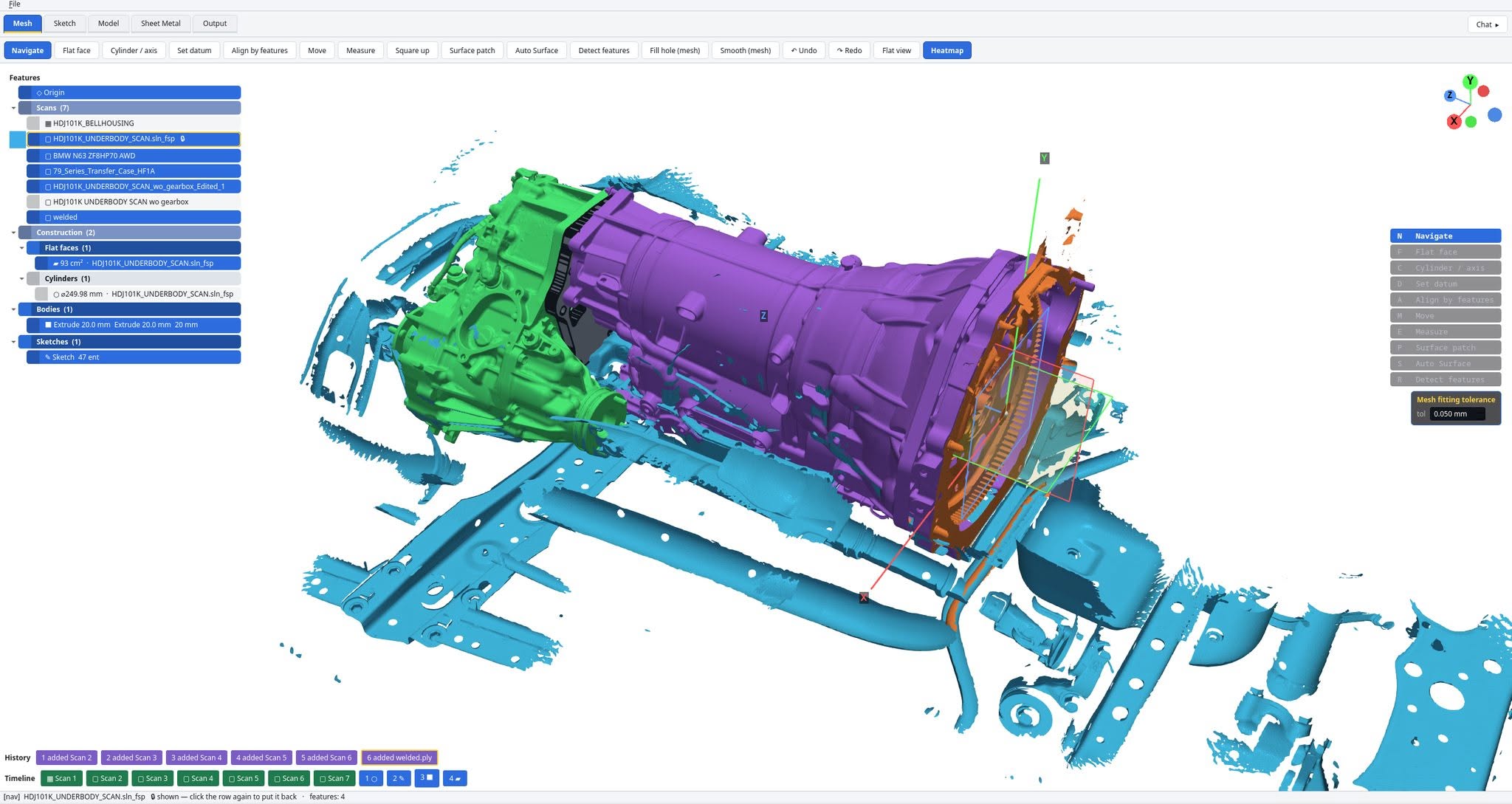
JDLSCAN with five aligned scans of the current job: a Land Cruiser HDJ100 underbody, a ZF 8HP70 gearbox, a 79-series transfer case and the bellhousing, with a fitted flat face and bore
The current job: five scans aligned, a flat face and a 250 mm bore fitted, the adapter plate extruded. Open full size

Reverse engineering software for large scans.

Align, section, sketch and fit directly on multi-gigabyte scan data, then export a true STEP. Built in our own workshop, for our own jobs. Pre-alpha; alpha testing with a small group is next.

Follow the development.

A$1,400
One-time purchase. Optional yearly upgrades. No subscription.
20 million triangles
The scans it is built for.
STEP export
True BREP: faces, holes, bodies.
Pre-alpha
In daily use on our own jobs.

Why it exists

The tools that do this cost more each year than the scanner. Our jobs run to 20-million-triangle scans, so we built one that keeps up. Whether it becomes a product is up to the people on this list.

Working today

On a real job, today

  • Datum alignmentby features, datum planes and square-up.

  • Mesh sectioningcuts on any plane, with smoothing, straight into a sketch.

  • Sketch toolsline, circle, arc, trim, fillet, offset, project, dimension, constraints.

  • Hole fittingbores fitted from the scan as true circles; concentricity and distance.

  • Solid modellingextrude, multi-area extrude, loft; bodies follow the scan.

  • STEP exportfaces and holes as BREP.

  • Large meshes20-million-triangle scans; reduce, weld, fill holes.

  • Fusion assembliesevery body and scan in place, through our bridge.

  • SpaceMouse3Dconnexion supported.

In development

Being built now

Auto Surface — primitives first, then a NURBS surface over the freeform remainder, exported as BREP. Measured on a transfer-case scan: 74 faces, 99% of the area.

Primitive extraction on very large scans, at reasonable memory.

Planned

In order

  1. 1CMM import
  2. 2Direct scanner capture (SHINING 3D FreeScan first)
  3. 3CAM
  4. 4FEA
  5. 5Sheet-metal nesting

Development log

As it happened

STEP export, driven for real

  • Export STEP writes true BREP — faces and holes — with every face validated first. First export of the adapter job: 49 shapes, 10 MB, opens in Fusion.
  • Faces come from the scan under the body; the sub-mesh is welded, so a face is one loop.
  • Holes are cut from their faces. Self-crossing cylinder trims build clean: 76 of 76 valid.
  • Licence model settled and tested: buy once, activate per machine, offline after that. A shared key on a third machine is refused.

Auto Surface: understand the part first

  • The part is mapped before any fitting: flat, cylindrical and freeform regions, and which ones touch. Transfer-case crop: 57 regions.
  • Each region is fitted at its own density.
  • Result: 74 faces, all valid, 99% of the scanned area, written to STEP and read back.
  • Freeform regions fit to about 0.06 mm.
  • Next: the button in the app.

Square up, and smoother sections

  • Square up: click a scanned face, click a plane or axis, read the angle, press Enter.
  • The angle shows before anything moves; datum planes are clickable; a locked scan says so.
  • Section smoothing: fewer points, a smoothed run, clean sketch lines from rough edges.
  • A gap setting closes boundaries the scan left open, so the region extrudes.
  • Extrude several areas at once; edit the areas of an existing extrusion.

Measure, move and section controls on the part

  • Measure gives distance, X, Y, Z and angle on every measurement; concentricity between bores.
  • Real geometry beats the datum planes under the cursor; clicked points stay visible.
  • Section depth is a slider on the part. Move and rotate share one control.
  • Deleted bodies stay deleted.

Clicks land where you click

  • Picking on large scans is exact: it had been a median 36.6 mm off, from three faults, all fixed at the root.
  • The first click in the face and cylinder tools is instant, down from 25 seconds.
  • A sketch is tagged to the part it was drawn on, by distance.
  • Region finding on a 69-line sketch: 58 extrudable areas, up from 2.
  • Snap anywhere along a section cut.

Follow the development.